1. 前言
在之前尝试过 AI 驱动的RPA程序完成给定的任务,但是整个运行下来给人的感觉就是太慢了,当时跑一个淘宝搜索产品并获取产品信息的任务跑了快10分钟,总结下来慢的原因无非下面几点。
- AI返回内容慢,通过OpenRouter调用gemini模型,一个请求要1-2分钟才能返回结果。
- 要实现程序
感知-决策-在感知-判断就要调用多次模型,模型调用次数越多就越慢。
所以,之前AI驱动RPA属于对技术的探索,但没有实际意义, 这次我尝试用AI来处理在自动化中会遇到的一些复杂验证码问题
下面是这次需要解决的验证码的例子,这三个验证码都来自Temu平台。
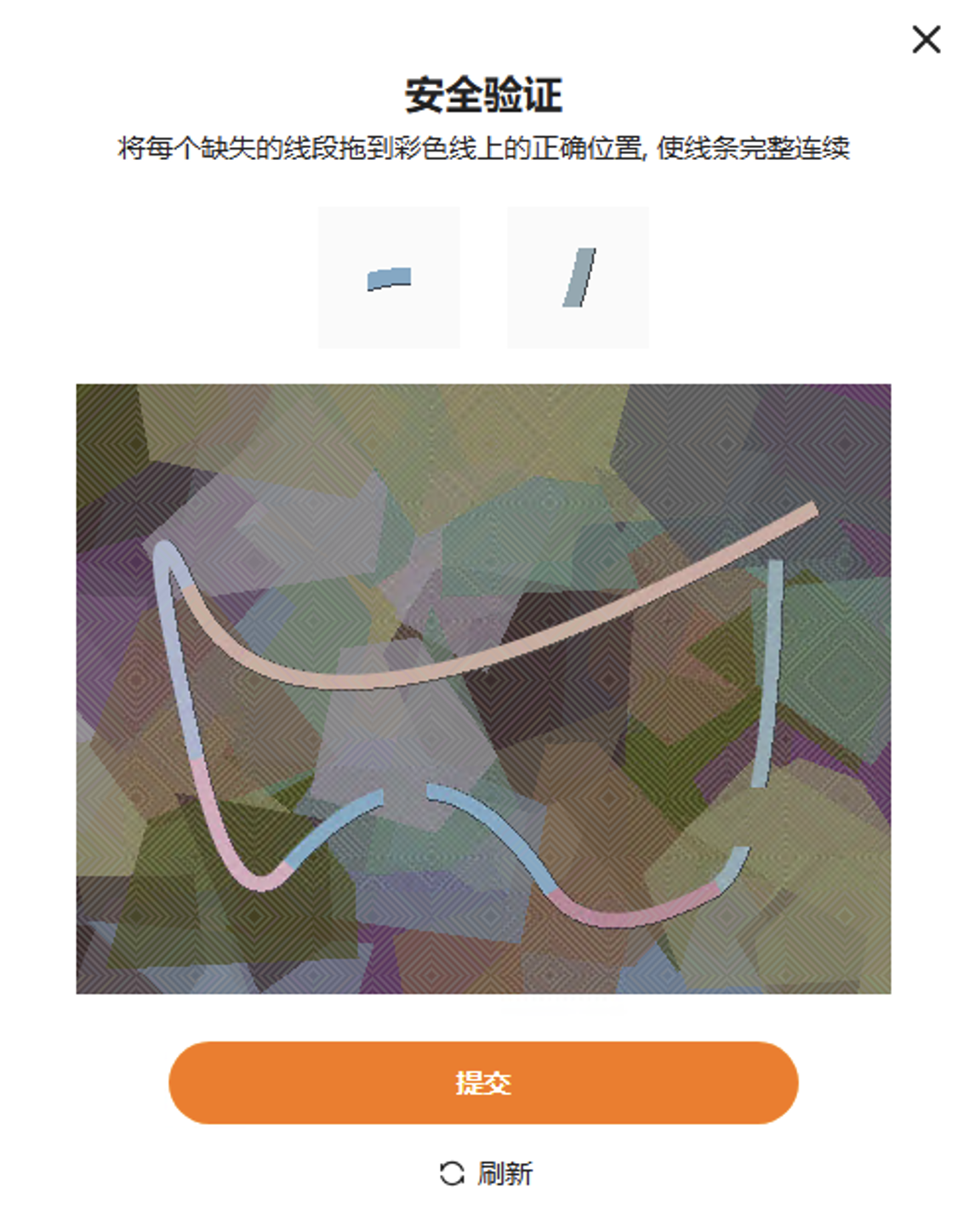
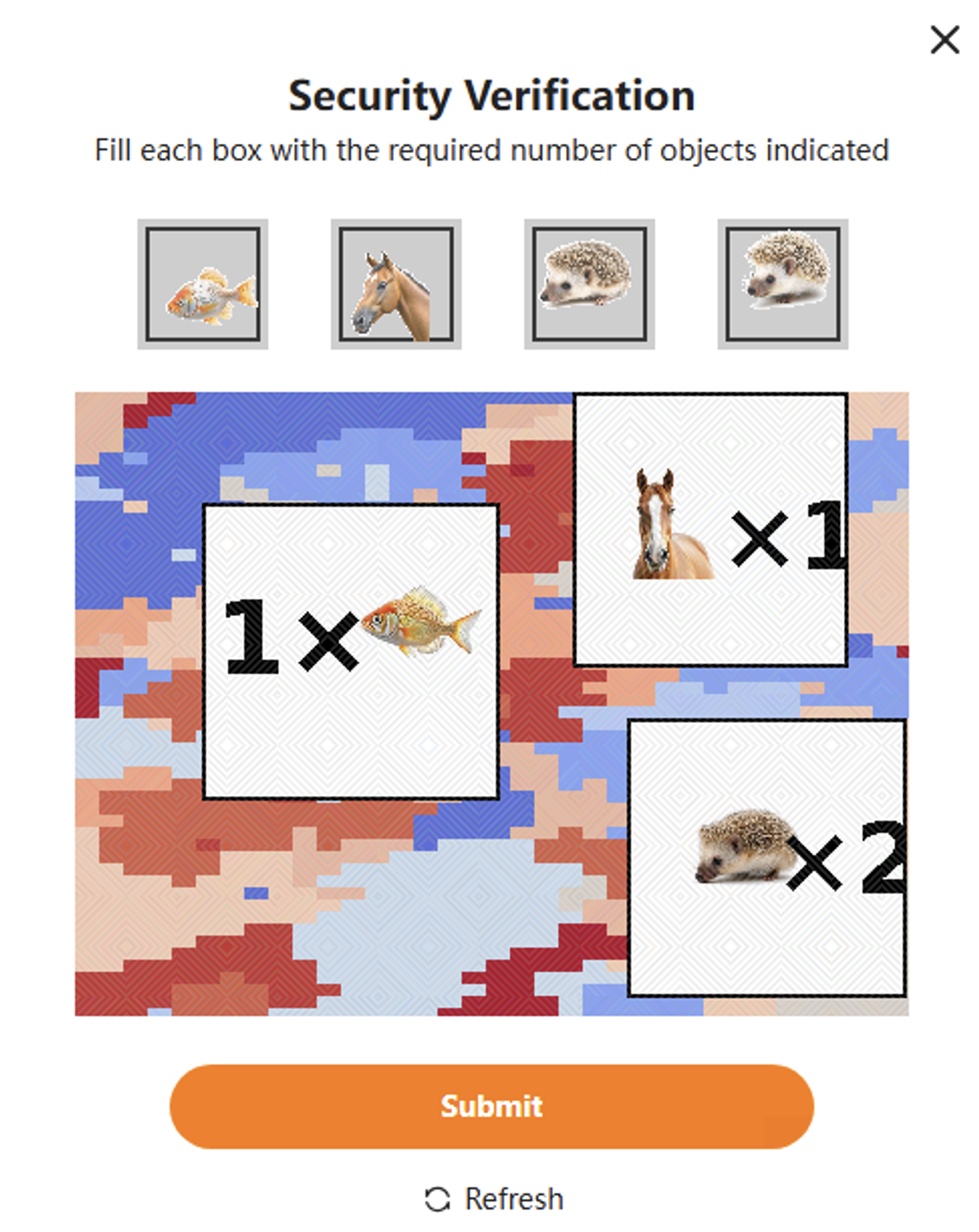
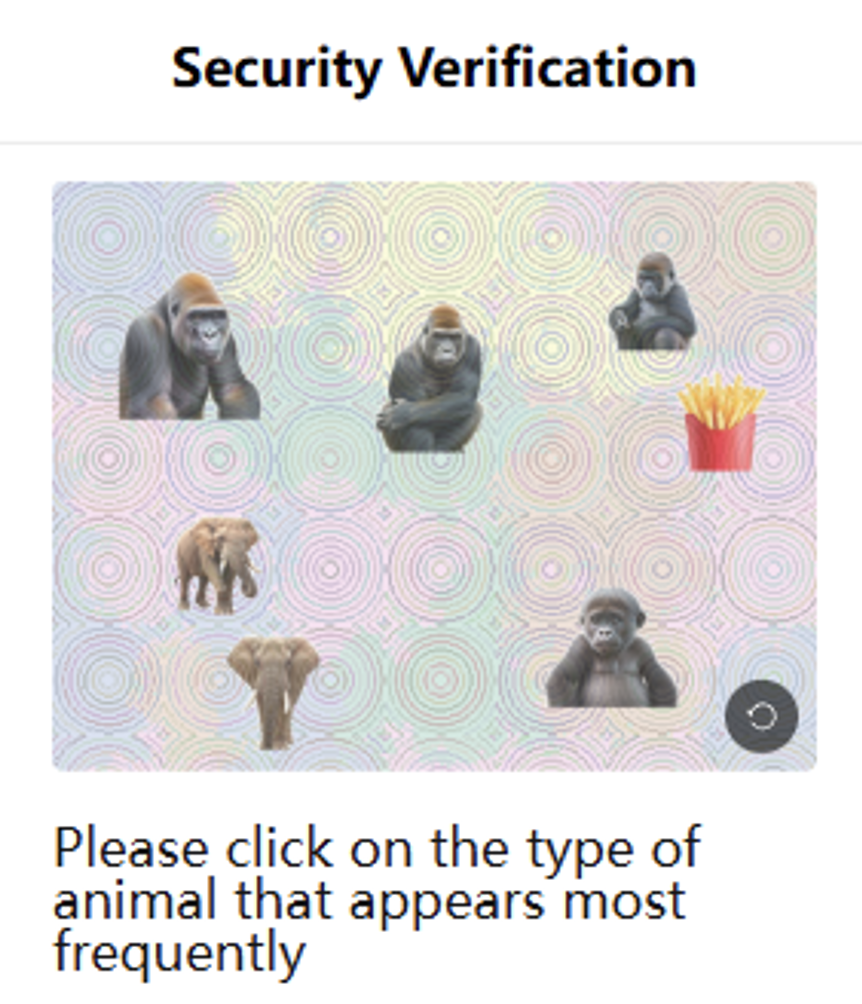
2. 核心思路
整体思路很简单,把验证码截图给AI,让AI按要求返回坐标,程序解析坐标并点击

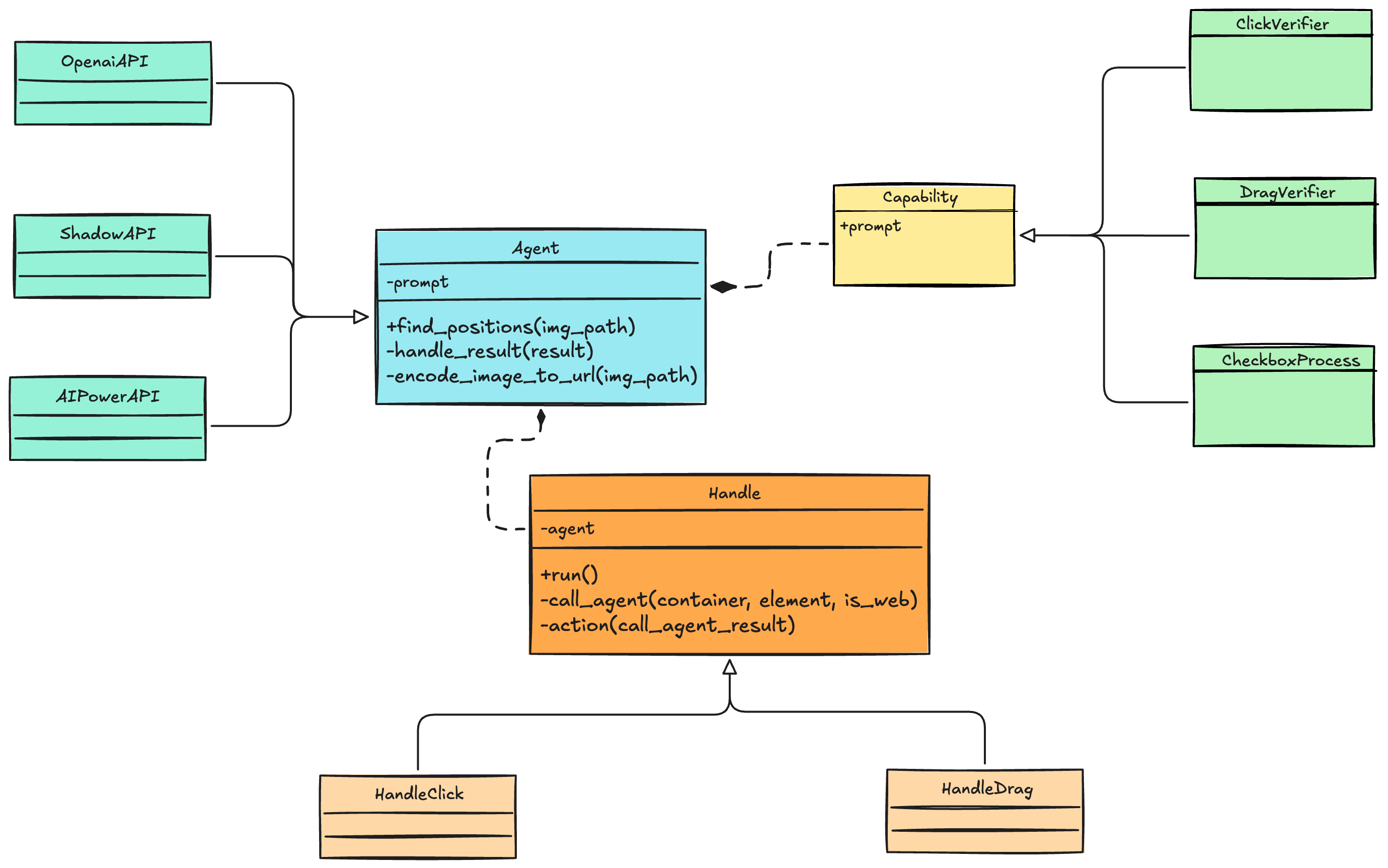
整体的代码设计如下图,首先是三个抽象类下面逐个解释一下。
-
Agent:用于调用AI接口,封装了图片解析、AI结果处理等功能,需要子类实现具体的AI接口 -
Capability:表示一种能力,就是给AI的提示词。 -
Handle:使用AI返回的结果处理问题
Agent有3个子类,分别是调用OpenAI规范的接口、调用影刀内置AI接口和调用影刀AIPower接口。
Capability的3个子类分别表示点选验证码处理、拖动验证码处理以及复选框处理
在做软件自动化时很容易遇到复选框无法判断是否勾选,这种情况就可以借助AI
Handle有2个子类分表用于,处理点击操作和处理拖动操作
3. 代码实现
ability.py
from abc import ABC, abstractmethod


class Capability(ABC):
    """
    表示一种能力, AI能做什么操作
    """
    @property
    @abstractmethod
    def prompt(self):
        pass


class ClickVerifier(Capability):
    @property
    def prompt(self):
        prompt = """
        请严格按照图片中给出的操作要求执行。

        图片中已经明确标注了需要点击的目标及点击顺序,
        你只需要根据图片内容,依次返回每一步需要点击的位置坐标。

        规则:
        1. 只返回图片中明确要求点击的内容,不要增加或省略步骤
        2. 坐标基于当前输入图片的像素坐标
        3. 坐标原点为图片左上角 (0, 0),x 向右,y 向下
        4. 每个坐标应尽量位于对应目标的可点击区域中心
        5. 如果图片中某一步无法明确定位,请不要猜测,在 summary 中说明

        输出要求:
        - 仅返回 JSON,不要输出任何多余文本
        - 不要使用 markdown
        - JSON 结构必须严格如下:

        {
            "positions": [
                { "x": xxx, "y": xxx },
                { "x": xxx, "y": xxx }
            ],
            "summary": "简要说明这些坐标如何对应图片中的点击要求"
        }
        """
        return prompt


class DragVerifier(Capability):
    @property
    def prompt(self):
        prompt = """
        图片中已经明确标注了需要如何拖拽内容
        你只需要根据图片内容,依次返回开始拖拽和结束拖拽的位置坐标

        规则:
        1. 坐标基于当前输入图片的像素坐标
        2. 坐标原点为图片左上角 (0, 0),x 向右,y 向下
        3. 每个坐标应尽量位于对应目标的可点击区域中心
        4. 如果图片中某一步无法明确定位,请不要猜测,在 summary 中说明

        输出要求:
        - 仅返回 JSON,不要输出任何多余文本
        - 不要使用 markdown
        - JSON 结构必须严格如下:

        {
            "positions": [
                {
                    "start": {
                        "x": xxx,
                        "y": xxx,
                    },
                    "end": {
                        "x": xxx,
                        "y": xxx,
                    }
                },
                {
                    "start": {
                        "x": xxx,
                        "y": xxx,
                    },
                    "end": {
                        "x": xxx,
                        "y": xxx,
                    }
                },
            ],
            "summary": "简要说明理由"
        }
        """
        return prompt


class CheckboxProcess(Capability):
    @property
    def prompt(self):
        prompt = """
        给你一张界面截图,你需要根据任务要求返回需要点击的复选框坐标
        如果一个复选框已经被点击则跳过该复选框

        规则
        1. 坐标基于当前输入图片的像素坐标
        2. 坐标原点为图片左上角 (0, 0),x 向右,y 向下
        3. 每个坐标应尽量位于对应目标的可点击区域中心
        4. 如果图片中某一步无法明确定位,请不要猜测,在 summary 中说明

        输出要求:
        - 仅返回 JSON,不要输出任何多余文本
        - 不要使用 markdown
        - JSON 结构必须严格如下:

        {
            "positions": [
                { "x": xxx, "y": xxx },
                { "x": xxx, "y": xxx }
            ],
            "summary": "简要说明这些坐标如何对应图片中的点击要求"
        }
        """
        return prompt
agent.py
import xbot_visual

import base64
import json
import re
import mimetypes
from abc import ABC, abstractmethod
from typing import List, Dict

from openai import OpenAI
from .ability import *


class Agent(ABC):
    def __init__(self, ability: Capability, params: Dict):
        """
        对于不同实现方式需要的参数可用params传入
        """
        self.params = params
        self.prompt = ability.prompt
        if "job" in params:
            self.prompt = self.prompt + f"\n你的任务是: {params['job']}"

    @abstractmethod
    def find_positions(self, img_path: str):
        """
        识别图片,按顺序输出需要点击的坐标
        """
        pass

    def handle_result(self, result):
        pattern = r"\{.*\}"
        match_result = re.search(pattern, result, re.DOTALL)
        if match_result:
            try:
                result_json = json.loads(match_result.group(0))
            except Exception as e:
                raise Exception(f"AI返回结果无法转为JSON格式, 内容: {result_json}")
            return result_json
        else:
            raise Exception(f"AI返回内容无法提取JSON数据, 内容: {result}")

    def encode_image_to_url(self, img_path):
        mime_type, _ = mimetypes.guess_type(img_path)
        if not mime_type:
            raise Exception("无法识别图片类型")

        with open(img_path, "rb") as image_file:
            base64_data = base64.b64encode(image_file.read()).decode('utf-8')

        return f"data:{mime_type};base64,{base64_data}"


class OpenaiAPI(Agent):
    """
    调用兼容OpenAI接口的模型
    :params: {"base_url": "https://xxxxxx", "API_KEY":"xxxxxx", model="xxxx"}
    """
    def __init__(self, ability, params):
        super().__init__(ability, params)
        self.client = OpenAI(
            base_url=self.params["base_url"],
            api_key=self.params["API_KEY"]
        )

    def find_positions(self, img_path):
        img_url = self.encode_image_to_url(img_path)
        content = [
            {"type": "text", "text": self.prompt},
            {"type": "image_url", "image_url": {"url": img_url}}
        ]
        messages = [{"role": "user", "content": content}]

        try:
            response = self.client.chat.completions.create(model=self.params["model"], messages=messages)
        except Exception as e:
            raise Exception(f"访问 {self.params['base_url']} 出现异常: {e}")
        return self.handle_result(response.choices[0].message.content)


class ShadowAPI(Agent):
    """
    使用影刀的接口调用其他模型识别验证码
    :params: {"ai_engine": "xxxx", model="xxxx"}
    """
    def __init__(self, ability, params):
        super().__init__(ability, params)

    def find_positions(self, img_path):

        result = xbot_visual.chatgpt.completions(
            ai_engine=self.params["ai_engine"],
            model=self.params["model"],
            use_multiModal=True,
            knowledge="",
            images=lambda: [img_path],
            prompt="",
            question=self.prompt
        )
        return self.handle_result(result)


class AIPowerAPI(Agent):
    """
    使用AIPower识别验证码
    :params: {"flow_id": "xxxx", "input_name": "xxx", "output_name": "xxxx"}
    """
    def __init__(self, ability, params):
        super().__init__(ability, params)

    def find_positions(self, img_path):
        result = xbot_visual.ai_power.run(
            flow_id=self.params["flow_id"],
            inputs=[
                {self.params["input_name"]: img_path, "type": "IMAGE", },
            ],
            outputs=[
                self.params["output_name"],
            ]
        )
        result = getattr(result, self.params["output_name"])
        return self.handle_result(result)


def create_agent(api_type, ability_name, params):
    ability_obj = globals().get(ability_name)
    if ability_obj:
        capability = ability_obj()
    else:
        raise ValueError(f"ability.py 中找不到 {ability}")

    mapping = {
        "OpenAI": OpenaiAPI,
        "影刀": ShadowAPI,
        "AIPower": AIPowerAPI
    }
    return mapping[api_type](capability, params)
action.py
import xbot_visual
from xbot.web import WebBrowser, WebElement
from xbot.win32 import Win32Window, Win32Element
from xbot.selector import Selector

import tempfile
import os
from PIL import Image
from .agent import create_agent, Agent
from abc import ABC, abstractmethod


class Handle(ABC):
    def __init__(self, api_type, ability_name, params):
        self.agent = create_agent(api_type, ability_name, params)

    def _call_agent(self, container, element, is_web):
        if hasattr(element, "find") is False and hasattr(container, "find"):
            element = container.find(element)
        bounding = element.get_bounding()
        with tempfile.TemporaryDirectory() as temp_dir:
            screenshot_func = xbot_visual.web.element.screenshot if is_web else xbot_visual.win32.element.screenshot
            kwargs = {"browser": container, "capture_area": "Element"} if is_web else {"window": container}
            img_path = screenshot_func(
                element=element,
                folder_path=temp_dir,
                random_filename=True,
                filename=None,
                **kwargs
            )
            with Image.open(img_path) as img:
                size = {"width": img.size[0], "height": img.size[1]}
            raw_result = self.agent.find_positions(img_path)
        return {
            "element_bounding": bounding,
            "img_size": size,
            "agent_result": raw_result
        }

    @abstractmethod
    def _action(self, call_agent_result: dict):
        pass

    def run(self, container, element, is_web):
        call_agent_result = self._call_agent(container, element, is_web)
        self.action(call_agent_result)


class HandleClick(Handle):
    def __init__(self, api_type, ability_name, params):
        super().__init__(api_type, ability_name, params)

    def _action(self, call_agent_result):
        bounding = call_agent_result["element_bounding"]
        agent_result = call_agent_result["agent_result"]
        img_size = call_agent_result["img_size"]

        for item in agent_result["positions"]:
            x = item["x"] / 1000 * img_size["width"]
            y = item["y"] / 1000 * img_size["height"]
            xbot.win32.mouse_move(
                point_x=bounding[0]+x,
                point_y=bounding[1]+y,
                move_speed="middle",
                delay_after=0
            )
            xbot.win32.mouse_click()


class HandleDrag(Handle):
    def __init__(self, api_type, ability_name, params):
        super().__init__(api_type, ability_name, params)

    def _action(self, call_agent_result: dict):
        bounding = call_agent_result["element_bounding"]
        agent_result = call_agent_result["agent_result"]
        img_size = call_agent_result["img_size"]

        for item in agent_result["positions"]:
            start_x = item["start"]["x"] / 1000 * img_size["width"]
            start_y = item["start"]["y"] / 1000 * img_size["height"]
            end_x = item["end"]["x"] / 1000 * img_size["width"]
            end_y = item["end"]["y"] / 1000 * img_size["height"]
            xbot.win32.mouse_move(
                point_x=bounding[0]+start_x,
                point_y=bounding[1]+start_y,
                move_speed="middle",
                delay_after=0
            )
            xbot.win32.mouse_click(click_type="down")
            xbot.win32.mouse_move(
                point_x=bounding[0]+end_x,
                point_y=bounding[1]+end_y,
                move_speed="middle",
                delay_after=0
            )
            xbot.win32.mouse_click(click_type="up")